
UX toolkit: Unmoderated usability testing
Get started conducting unmoderated user testing to better understand how usable your users find your product
Introduction
What is Unmoderated Usability Testing?
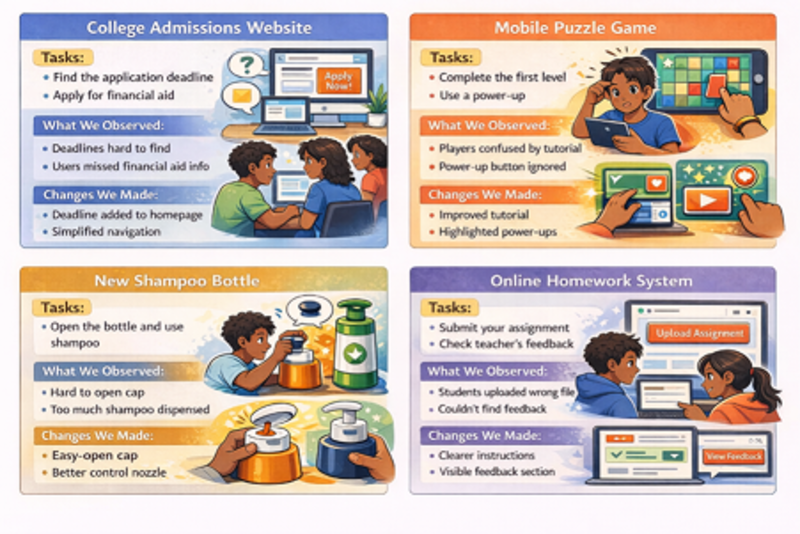
Usability Testing, sometimes called user testing, is a research method used to evaluate how effective and easy to use a product is (or is not) by observing real users as they try to complete tasks using the product.
Unmoderated Usability Testing is a type of usability testing conducted without the guidance of a moderator. Instead, the researcher sets up tasks with instructions for the participant to complete independently, usually via a research platform while the user self-guides through the study.
These research platforms can also record the session, capturing things like the participant’s screen activity and their audio and video as they use the product.
See it in action
Curious about what unmoderated usability testing looks like from the user’s perspective? Try this quick demo research study and experience it for yourself.
When should you use unmoderated usability testing?
Unmoderated usability testing works best when tasks are short, direct, realistic, and easy for participants to complete on their own. Because there is no facilitator to guide or clarify, instructions need to stand on their own.
You will also need the product to be tested or something representing the product. The product being tested does not need to be a fully built out or bug-free product, but it should be defined enough so that users can understand what it is and have a general sense of how they might use it. If an actual testable product is not available, you should have some type of artifact or prototype that others can understand and react to, even if they cannot fully interact with it. Even a simple prototype can still be highly effective for unmoderated usability testing.
Ask the UX Team…
Not sure if your project is a good fit for unmoderated usability testing? Have questions about prototypes? The UX Team can help you explore other usability testing formats, or a different research method altogether. We can help you build a prototype too: book a consultation meeting with the UX team.
Before you get started
Set up, planning, & securing resources
Like all user research, there is some planning and logistics involved before you start conducting your own primary research.
Resources to secure
- Account with an usability testing research platform
- Prototype or artefact to be tested
- Compensation or incentives for participants
UX Docs to create
- Research Plan
- Usability Testing Script (tasks, instructions, etc.)
- Participant Recruitment & Research Ops Plan (including Recruitment Screener)
- Consent Form
- Usability Testing Study Script [TEMPLATE]
- Usability Testing Study Script [SAMPLE]
Ask the UX Team…
The UX Team can help you determine and secure the resources you need for testing. We can also review your UX Docs to make sure you have everything covered: book a consultation meeting with the UX team.
| Week no. | Study planning + set-up | Recruiting + research ops plan |
|---|---|---|
| Week 0 |
|
|
| Week 1 |
|
|
| Week 2 |
|
|
| Week 3 |
|
|
| Week 4 |
|
|
How to conduct unmoderated usability testing
What to do
Study setup
1. Secure a testing tool.
Choose a usability testing research platform and set aside time to practice using it. You can also schedule a demo or training session with the UX Team.
2. Draft your tasks and instructions.
See: Developing tasks for usability testing
Use existing research, anecdotal insights, metrics, service tickets, feedback forms, or stakeholder input to inform your tasks. Focus on realistic, goal-based tasks.
3. Program the study into your testing tool.
Add your tasks and instructions into the research platform. Test the study with someone who has not seen the product or study before, such as an internal team member. Check for clarity, comprehension, and flow.
4. Refine.
Make updates based on the pilot feedback before launching. Conducting sessions
5. Launch the study.
Distribute testing material and links via email or your designated research testing tool platform.
6. Monitor incoming responses.
Watch or preview incoming sessions regularly to ensure participants understand what they are supposed to do and aren’t encountering any major issues.
7. Debrief between sessions.
Debrief at the end of the day (or at least twice throughout the study) to review early findings with your team. If major, fixable issues emerge, adjust the study or prototype for remaining participants when appropriate.
8. Continue Research Ops support.
Manage participant reminders, confirmations, and all other communication and logistics throughout the study according to your Research Ops Plan.
Developing tasks for usability testing
How to write good tasks
Your tasks should be clear, goal-based scenarios that reflect realistic user behavior. The table below highlights the main rules and requirements for writing usability testing tasks.
6 Types of Tasks for Unmoderated Usability Testing
Below are common task types you can incorporate into your study. This is not an exhaustive list, but you will likely find that many of your tasks fall into one of these categories.
Natural behavior and exploratory tasks
What it is
Open-ended tasks that allow users to explore the product freely and react naturally.
Goals
- Assess whether users understand the product’s purpose
- Evaluate perceived usefulness
- Identify what captures attention first
- Surface what users overlook
- Understand how users might apply the product to their work
Sample questions
- What are your first impressions?
- What do you think you can do here?
- What would you use this for?
- What questions do you have?
- Is anything here relevant/not relevant or useful/not useful to you?
End-to-end flow tasks
What it is
Tasks that require completing a full workflow from start to finish.
Goals
- Identify breakdowns across the full journey
- Evaluate overall flow and efficiency
Sample questions
- Complete a purchase.
- Submit a request.
- Schedule an appointment.
Navigational tasks
What it is
Tasks that assess how easily users can locate information and features.
Goals
- Evaluate how intuitive the interface is
- Determine whether navigation aligns with users’ mental models
- Measure efficiency in finding key content or features
- Assess feature discoverability
Sample questions
- Try to find…?
- Where would you go if you needed to…?
- Are all of the key resources you need available here?
- Locate information about…
“Ask the user” tasks
What it is
Pose questions about their workflows and processes, then transition those into task questions based on how they answered.
Goals
- Understand current workflows
- Identify pain points and unmet needs
- Ground testing in real user behavior
Sample questions
- In your day to day role, what are the three most common tasks you need this system to perform.
- Have you ever had an issue using this product? If you can, try to recreate that task. Show us what you did and what happened?
Logic, recall & comprehension tasks
What it is
Tasks that require users to interpret information, make decisions, recall knowledge, or apply judgement.
Goals
- Assess decision-making and reasoning
- Identify gaps in clarity or supporting information
- Understand how users interpret instructions, data, or system feedback
Sample questions
- Based on what you see here, what would you do next?
- How would you decide which option to choose?
- What information would you need to feel confident completing this task?
Error recovery tasks
What it is
Tasks that explore what happens when users encounter issues.
Goals
- Assess how easily users recover from errors
- Evaluate visibility and usability of help resources
- Identify breakdown points in support flows
Sample questions
- If you could not complete this task, what would you do next?
- How would you get help if you couldn't do….?
Next steps: sharing & reporting
What to do
Once your test has launched you will want to start taking notes right away. Doing so in a structured way using our templates will help you stay organised and turn your findings and insights into a simple report to share with your team and other audiences.
1. Take notes
Record task outcomes and key observations in your UX Notebook.
DOWNLOAD: UX Notebook
See also: Taking Notes For Usability Testing
2. Synthesise findings
Summarise sessions and compare notes with project team members.
3. Report results
Use the Reporting Template to aggregate insights and share with your team.
DOWNLOAD: Unmoderated Usability Testing Report [TEMPLATE]
DOWNLOAD: Unmoderated Usability Testing Report [SAMPLE]
References and resources
Further reading
- Tools for Unmoderated Usability Testing (Nielsen Norman Group)
- Remote Usability Testing: Study Guide (Nielsen Norman Group)
- Remote Usability Testing Costs (Nielsen Norman Group)
- Qualitative Usability Testing: Study Guide (Nielsen Norman Group)
Glossary
There many common terms used in UX that may need explanation, to familiarise yourself with some of the terminology, please take a look at our glossary of UX terms.

